Small Business Technology Blog

Tuesday, April 12, 2011

Twilight Game Scam Spreading on Facebook [WARNING]

If you’ve been tagged in a Facebook friend’s photo album or seen a link promoting a Twilight: Breaking Dawn game, be careful. It is likely a scam designed to spread on Facebook and grab your personal data.


If you click on the link, you’ll be invited to start playing the game. If you’re using Facebook HTTPS, you will first be prompted to switch to a regular connection, which should alarm some users.

This particular scheme will make you “Like” the game without your permission, and it will show on your Wall, thus allowing it to spread further.


If you continue, you will be asked to give permission to a Facebook App, and finally you will be asked to fill out a questionnaire with some personal data.

As always, you should definitely avoid clicking on suspicious links such as these and verify each app before you give it additional permissions on Facebook.

If you’ve fallen prey to this scheme already, you should delete any spam posts you may have inadvertently sent. Then, go through your security settings and revoke any access for apps you don’t recall signing up for.

For more info on how to get rid of Facebook scams like this one, check out this guide.

Monday, April 11, 2011

Windows 7 finally overtakes Windows XP’s desktops


Desktop OS market share United States April 2011

According to the latest results of the desktop OS market share in the US for April 2011 collected by StatCounter, it looks like people are finally leaving Windows XP behind and getting an upgrade to Windows 7.

For the first time since it became the most popular operating system around, Windows XP’s market share has been trumped by Windows 7.

Windows 7 is now used on 31.71% of desktops in the US, while Windows XP has dropped to 31.56%.

Now the lead isn’t a lot but it does show that Windows XP has finally peaked and is on its way out now.

Windows Vista is at third place with 19.07%, Mac OS X at fourth with 14.87%, Linux is last with 0.70% and Other/miscellaneous operating systems make up 2.09% of the chart.

Importance of note is the increase in Mac OS which sat at less than 10% for many, many years, but now enjoys a much healthier percentage.

It's important to note that this chart does NOT non-Desktop/Laptops so don't be surprised that the iPhone OS (iOS), blackberry and even Android aren't listed.

Is your business still running windows XP applications? Does it need to be? Some applications previously only windows XP compatible are now fully functional in a windows 7 environment and with the added security and protection Win7 offers over XP it's worth a look.

While we've done our best in the past to help clients find windows XP computers from suppliers even up until the end of 2010, it's now almost impossible to find NEW copies of XP, sure you can go used, off lease or refurbished, but new, Windows XP is just not available in the marketplace for purchase anymore. Even our might netbooks are now windows 7 starter edition.

So, is your business getting everything it can and should be out of it's operating system? Give us a call at Outhouse IT, we're here to help.

Clean the C&@# out of your computer with CCleaner.

There are a lot of tools out there that handle a lot of tasks, from antivirus tools that also clean your drive of temporary files and make you coffee to tools that promise to “make your computer faster.”

But as far as I’m concerned, few tools can make as much of a difference as Ccleaner, at least on a machine that’s not infected by a virus or malware.

Ccleaner is easy to use and will keep your computer cleaner, more secure, and running faster. It achieves this by safely removing temporary Internet files (and other means of tracing Internet activity), cleaning up the Windows registry, and removing temporary files and recent file lists (MRUs) from various applications.

But even though Ccleaner is a simple tool to use, that doesn’t mean you should just jump in and start cleaning everything without a bit of thought. Here are some things all users should consider before and during the use of this powerful tool.


1: Analyze before running the Cleaner

I know a lot of admins who just fire up Ccleaner and hit the Run Cleaner button without doing an analysis first. Yes, this is a fast method of getting rid of temporary Internet files. But there’s no way of knowing what’s going to be deleted (until it’s deleted) and there’s no way of knowing how much free space the deletion is going to create. Make sure you hit the Analyze button first. Then, after you read the report, hit the Run Cleaner button. Using Ccleaner this way ensures that nothing is deleted that shouldn’t be deleted. Also, after you run the analyzer, you can look at detailed information (by application) and then add exceptions directly from the list.

2: Set up cookies you want to keep

When you run the Cleaner, cookies are deleted. By default, cookies are retained from Google and Yahoo, but other cookies might need to be retained. To manage this, click on the Options tab and then on the Cookies button. From that window, any cookie currently on the system can be selectively added to the exclusion list. By adding these exclusions, you don’t have to worry about important cookies disappearing after each run of Ccleaner.

3: Always back up the registry

No matter how reliable Ccleaner is and no matter how many successful registry cleanups it does, never do a cleanup without first backing up the registry. Ccleaner will go so far as to remind you to back up the registry every time you run a registry cleanup. If the registry is not backed up, one of those corrupt or missing registry keys that Ccleaner fixes might not really have needed fixing. If that key is then broken and was not backed up, the issue caused by Ccleaner could become catastrophic. Fortunately, Ccleaner makes backing up the registry as simple as a couple of clicks.

4: Use the tools to manage startup applications

Ccleaner comes with a bonus: It lets you enable, disable, or remove programs from startup. I have always found this method of managing startup applications far easier than using the standard Windows method. What I like most about this feature is that startup applications can be enabled and disabled without removing them completely. This means if you need to temporarily prevent an application from starting up, it’s easy to do by going into the Tools tab, clicking the Startup button, selecting the application to be enabled/disabled, and clicking the appropriate button. When the application needs to be re-enabled/disabled, reverse the process.

5: Use the uninstaller

One of the best aspects of Ccleaner is the ability to remove applications from within it. It typically just starts the uninstaller, but I have found that running the application uninstaller this way ends with fewer registry issues than when I uninstall from the Windows Add/Remove Programs tool. And if there are registry issues after the uninstall, registry cleanup is only a couple of clicks away.

Great tool, used wisely

Ccleaner is more than just a tool to clean the registry or empty a computer of temporary Internet files. It also makes it easy to remove applications from startup and remove applications from the machine. Just make sure you use this powerful tool intelligently to avoid rendering your machine unusable. While they try to make it difficult to make mistakes, it is possible to render your computer unuseable by running some of the tasks ccleaner offers, so if you're not sure, err on the side of caution. And if you want to make the most of your technology, give us a call at Outhouse IT, it's what we do.

Tuesday, March 29, 2011

Online Fax Security

Online Fax Security The security of fax transmissions is especially important to healthcare, legal, and financial entities. Even occasional users may wonder if Internet faxing, despite its many advantages, is secure enough to protect their confidentiality and that of their clients. The answer is, it depends...
First, let's compare Internet fax security to the security of normal fax transmissions over phone lines.

Both are susceptible to eavesdropping and diversion of transmissions, unless special precautions are taken. In the case of Internet faxes, encrypting a digital transmission or uploading it to a fax server over an encrypted Web connection provide good protection against interceptions. You should make sure that these security features are supported in any Internet fax service you consider.

Faxzero, an online faxing service I recommend, does encrypt all data before transferring it to their fax servers. In addition, their privacy policy states that they will not release personal information (such as your name, fax number or email address), nor information about the people you send faxes to, unless a court order compels them to do so. 

Email-to-fax services can be spoofed, meaning someone can fake your email address in a message header and send faxes in your name. If you pay for Internet fax service that means you may be stuck with someone else's fax bill. A good Internet fax service sends a confirmation email back to the sender's email address with every fax it sends, providing an alert that an unauthorized fax was sent using your account. 

Digital Delivery Offers Enhanced Fax Security

Normal faxes end up printed and deposited in a fax machine's receiving tray, where they lie until someone comes to retrieve them. These paper copies are exposed to everyone who has access to the fax machine, and may be accidentally read by people searching for their own faxes in the stack. Email-based Internet fax delivers faxes directly to the addressee's inbox (instead of a fax machine), where it's less likely to be seen by others.

Another security scheme stores received faxes on an online server. An email notice sent to the addressee contains a web link which points to the digital fax document. When clicked, the link opens a Secure Sockets Layer (SSL) connection to retrieve the document and display it in a browser, from which the recipient can save or print a copy. So the faxed document is never exposed on an unsecured connection.

Redundant security can be provided by using a Virtual Private Network (VPN) to establish exclusive connections over the Internet. Coupled with encrypted fax documents and PGP digital signatures, VPNs may be overkill when it comes to secure Internet faxing.

It's hard to control the security implemented by business partners. If you send an Internet fax to a partner's fax machine number, the printout is subject to the security vulnerabilities noted above. If possible, you should get your partners to use a more secure all-digital Internet fax solution such as fax-to-email or the SSL method described above. Hopefully, they're just as concerned with security as you are.

Bottom line, my take is that internet faxing is more secure than using good old-fashioned office fax machines, because encryption is typically NOT used when sending from one machine to another. Faxes travel across the public telephone network, and are subject to potential interception by motivated hackers. But because encryption is used by online fax services, and faxes can be delivered directly to the recipient's inbox, online faxing is a more secure option.

Friday, March 25, 2011

Two Weeks After Japan Earthquake, IT Industry Faces Hurdles

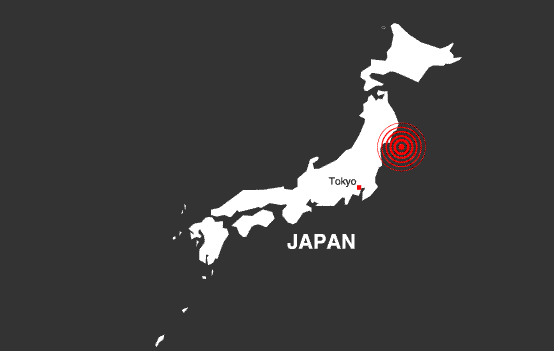
Two weeks have passed since a magnitude 9.0 earthquake and subsequent tsunami rocked eastern Japan, and while a recovery among the country's technology manufacturers has begun, it could be several months before things start to normalize.

Many factories were closed immediately following the quake, and most have been gradually returning to production in the last week. A handful of plants were hit harder and could be offline for months.

Companies face a daunting task.

Japan's biggest earthquake ever recorded, and the tsunami it spawned, left more than 10,000 people dead and an even larger number missing; several nuclear power plants remain in emergency condition and continue to spew radioactive contamination to the environment; hundreds of thousands are homeless; and the economy is being forced to adapt to power failures and supply disruptions. The end of the disaster is still not in sight.

For IT companies, the loss of production at these plants could have widespread effects on the electronics industry.

Texas Instruments' plant in Miho, northeast of Tokyo, is one of the factories that was hard hit. The plant, which produced chips and DLP devices for projectors, suffered "substantial damage" and it won't be until May when partial production resumes. Full production is not due until mid-July, and that could be further delayed by power problems, the company said.

Toshiba estimates production at its mobile phone display factory in Saitama, north of Tokyo, will be stopped for a month because of damage sustained in the earthquake.

Further north in Miyagi prefecture, a number of factories near the quake-hit city of Sendai suffered high levels of damage.

A Sony plant responsible for magnetic tape and Blu-ray Discs was inundated with water when a tsunami washed through the town of Tagajyo and is one of six Sony plants currently idle. Two Nikon plants were severely damaged and won't be back online until at least the end of March. And Fujitsu's major chip plant in Aizu Wakamatsu is still closed with no estimate of when production will begin again.

But some of the potentially biggest disruptions could come from the closure of two plants run by Shin-Etsu Chemical. Although not a well-known name to consumers, the company is a major supplier of silicon wafers. One of the halted plants, its Shirakawa facility in Fukushima prefecture, is responsible for around 20 percent of the world's supply of such wafers, according to IHS iSuppli.

"The wafers made by this facility mainly are used in the manufacturing of memory devices, such as flash memory and DRAM," said Len Jelinek, an IHS iSuppli analyst, in a statement. "Because of this, the global supply of memory semiconductors will be impacted the most severely of any segment of the chip industry by the production stoppage."

The knock-on effects of the quake to the global supply chain are already being felt.

Sony suspended production of Bravia LCD televisions, digital cameras and other products at five factories far from the quake zone because it can't get raw materials and components. Suppliers are unable to deliver because of either quake and tsunami damage or because of disruptions to the distribution network.

Industries beyond consumer electronics are also likely to feel the effects of these problems.

The automobile industry is a big customer of chip companies and the products it buys are often custom-made.

"Products like microcontrollers and DSPs can't simply be swapped out for another chip, whether from the same vendor or another," said Tom Starnes, an embedded processor analyst at Objective Analysis in Austin, Texas. "The programs aren't easily transferable between processors, and even changing other chips like analog may introduce cost, quality, or reliability issues not originally anticipated."

The long-term effect on Japanese electronics manufacturers and the supply chain remains difficult to gauge. Several major companies have said they will delay the hiring of new workers, usually done on April 1, and some have adjusted or canceled dividend payments to shareholders. While a nascent recovery appears to be underway and some factories are coming back online, it will be weeks before the full extent of damage to the global IT supply chain becomes clearer.